 MINT
Achieve by Petra: a step-by-step guide to goals and investing
Explore the app, follow a goal from target to Auto Top-Up, compare investment options, and learn what to check before contributing.
Before we begin
Achieve by Petra is an app through which you can organise financial goals and access different investment options. The useful question is not only “How do I download it?” It is also “What happens to my money after I choose a product?”
This is an educational walkthrough, not a paid advertisement or sponsored lesson.
Referral disclosure: the invitation button below uses MINT's referral link. Using it may benefit the referrer under Achieve's applicable referral terms. No particular reward, discount or investment return is promised in this lesson.
By the end, you should be able to:
- Identify the company behind the app and check its regulatory listing.
- Distinguish an app feature from the investment underneath it.
- Set a goal amount, deadline and contribution frequency.
- Understand the difference between a contribution estimate and a payment instruction.
- Check risk, charges and access conditions before committing money.
The walkthrough follows the screenshots supplied for this lesson. Screens, product availability and terms can change. The examples are for learning; they are not recommendations to choose a particular fund.
Step 1: identify who is behind the platform
Achieve's official website identifies Petra Securities Limited, a Petra subsidiary, as its provider. Achieve's provider information
As checked on 9 October 2026, Petra Securities Limited appears on the Securities and Exchange Commission Ghana's licensed broker-dealer list. You can repeat that check yourself. SEC licensed broker-dealers
Separate these three questions:
| Question | What you are checking |
|---|---|
| Who provides the app? | The company you are dealing with |
| What investment will hold my money? | The actual fund, security or contractual product |
| Who manages and safeguards that investment? | The named manager and relevant custodian or trustee |
A company licence is useful evidence about that company. It does not mean every option has the same risk, that a regulator promises your return, or that a withdrawal can never be delayed.
Before paying, write down the exact product name. “My money is in Achieve” describes the access platform, but does not fully describe your investment.
Step 2: get your account ready
Achieve's FAQ describes account activation using an email address, phone number, Ghana Card, personal information and next-of-kin details. Follow the current identity-verification prompts in the official app. Achieve account FAQs
A practical order is:
- Open the invitation link at the end of this lesson.
- Follow the official app download or opening flow appropriate to your device.
- Check the app identity and provider before installing.
- Complete registration and verification.
- Read the product information before making a contribution.
- Set up a supported payment method only when you understand the authorisation.
Submit identity documents inside the official verification flow. Never send your PIN, password or one-time code to someone offering to “activate” an investment for you.
If a screen asks for next of kin, complete it accurately and ask how the provider handles death claims. Do not infer ownership or inheritance rights from the field label alone.
Step 3: understand the menu
The supplied Explore screen shows several different ways to organise or access investments.
| Feature shown | What to understand before using it |
|---|---|
| Flexible Investments | Compare the available products and their access conditions |
| Goals | Give an investment a purpose, target amount and target date |
| Fixed Investments | Check the specified period, maturity instructions and early-access terms |
| Groups | Understand who can contribute, authorise withdrawals and manage membership |
| Investment Challenges | Read the challenge dates, contribution rules and underlying product |
| Petra Accounts | Check which existing pension or other Petra accounts can be linked |
These are features, not interchangeable guarantees. A goal called “school fees” still needs an underlying investment suitable for the fee deadline.
The supplied screen also contains a challenge marked as ended. A visible challenge card is not evidence that it is still open for new participation.
Step 4: compare the investment options
The supplied product screen labels DigiSave as low risk, DigiSave Plus as low-to-medium risk, Eurobond Trust as medium risk, Plus Balanced Fund as medium-to-high risk, and Enhanced Equity Beta Fund as high risk.
Those are the app's displayed labels, not independent MINT ratings. They are a starting point for questions, rather than a complete assessment.
View the investment options screenshot
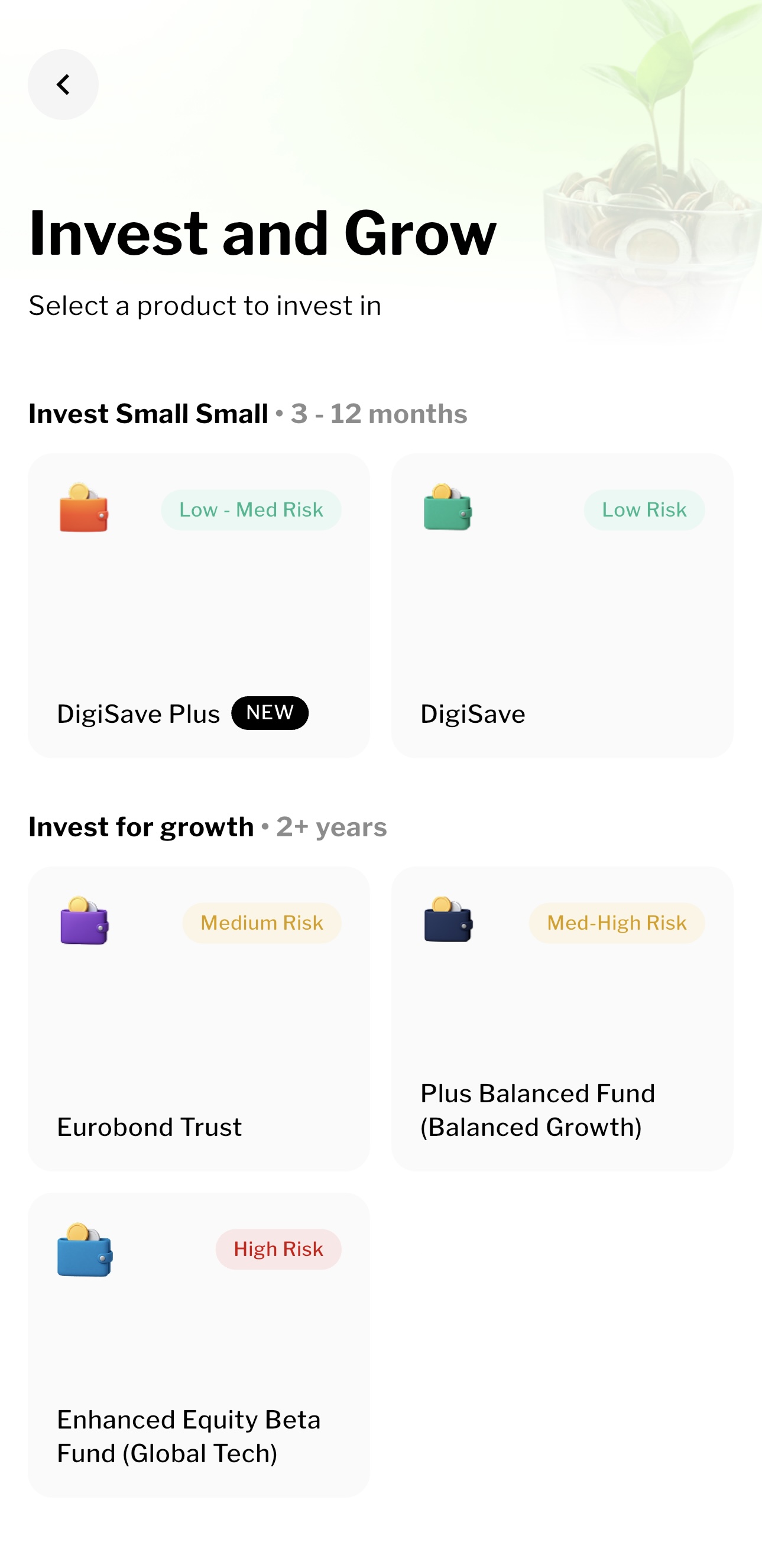
One example of why the underlying product matters: Achieve describes DigiSave Plus as investing in the Sentinel Ghana Fixed Income Trust, managed by Sentinel Asset Management, with GT Bank holding assets for safekeeping. Its explanation acknowledges that the fund's value can fall. DigiSave Plus product explanation
Before choosing any option, ask:
- What assets does it hold?
- Can my balance fall, and what could cause that?
- Is any displayed return historical, projected or contractually specified?
- Are there currency-conversion costs or exchange-rate exposure?
- What are the minimum contribution, ongoing charges and withdrawal conditions?
- Where can I read the current product document?
“Fixed income” does not by itself mean a fixed account value. “Low risk” does not mean no risk. Choose based on the purpose and timing of your money, as well as the possibility of growth.
Step 5: turn a goal into a plan
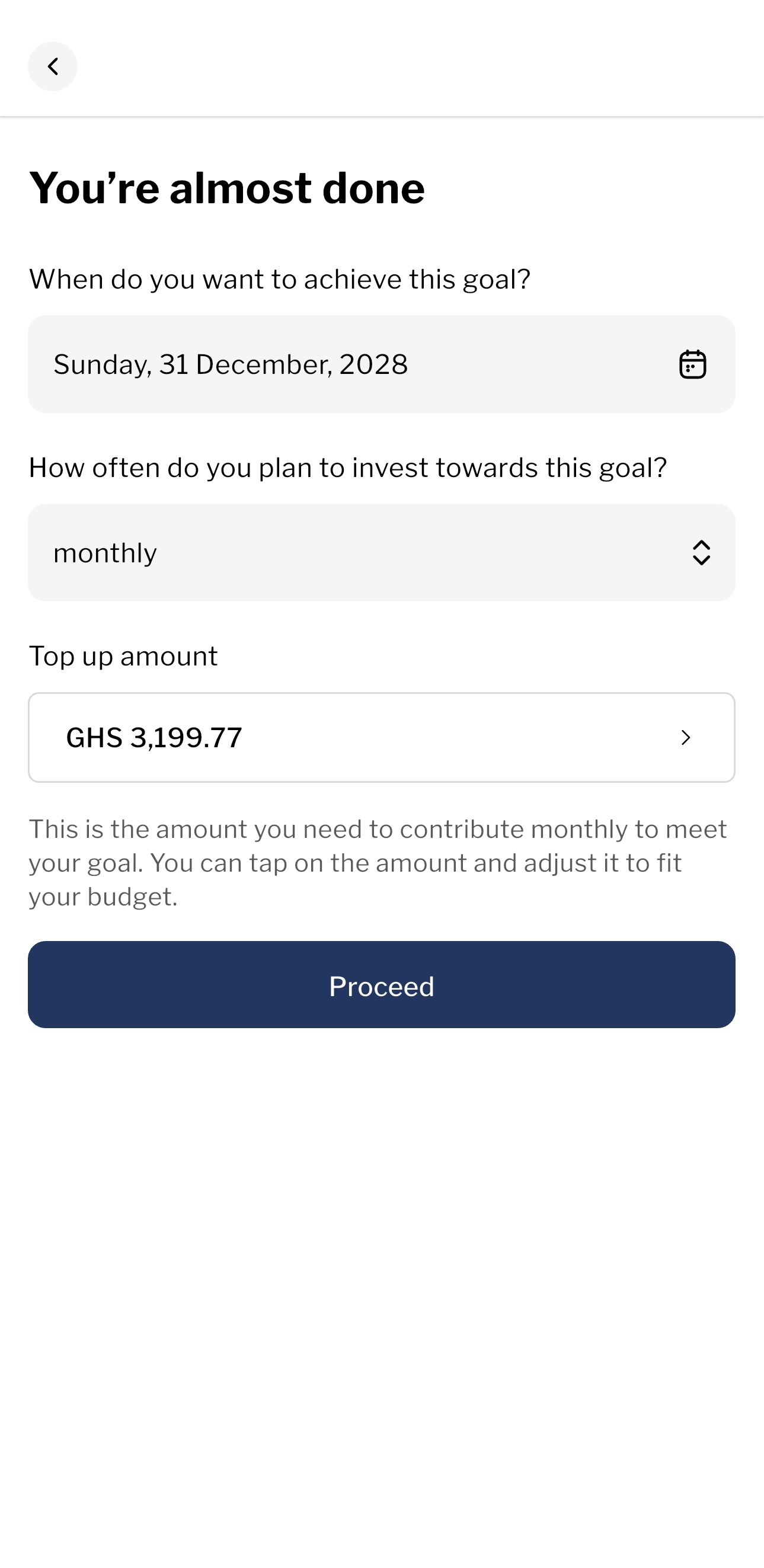
The supplied screens demonstrate a goal called “my first car”, with a GHS 100,000 target and 31 December 2028 target date.
That amount is a demonstration target, not a statement about current car prices in Ghana. For a real purchase, research the item and related costs separately.
Follow the goal-setting sequence
- Open Goals, or the relevant investment journey in your version of the app.
- Review the underlying investment option. If asked whether you have a target amount and date, choose the answer that matches your plan.
- Name the account so its purpose is clear.
- Enter the target amount.
- Choose the date when you want to reach it.
- Choose daily, weekly or monthly contributions.
- Review the suggested contribution and any payment instructions before proceeding.
The official Goals page also describes target amounts, dates and contribution recommendations. Its menu sequence may differ from the supplied screenshots. Achieve Goals
View the goal name and target amount screens
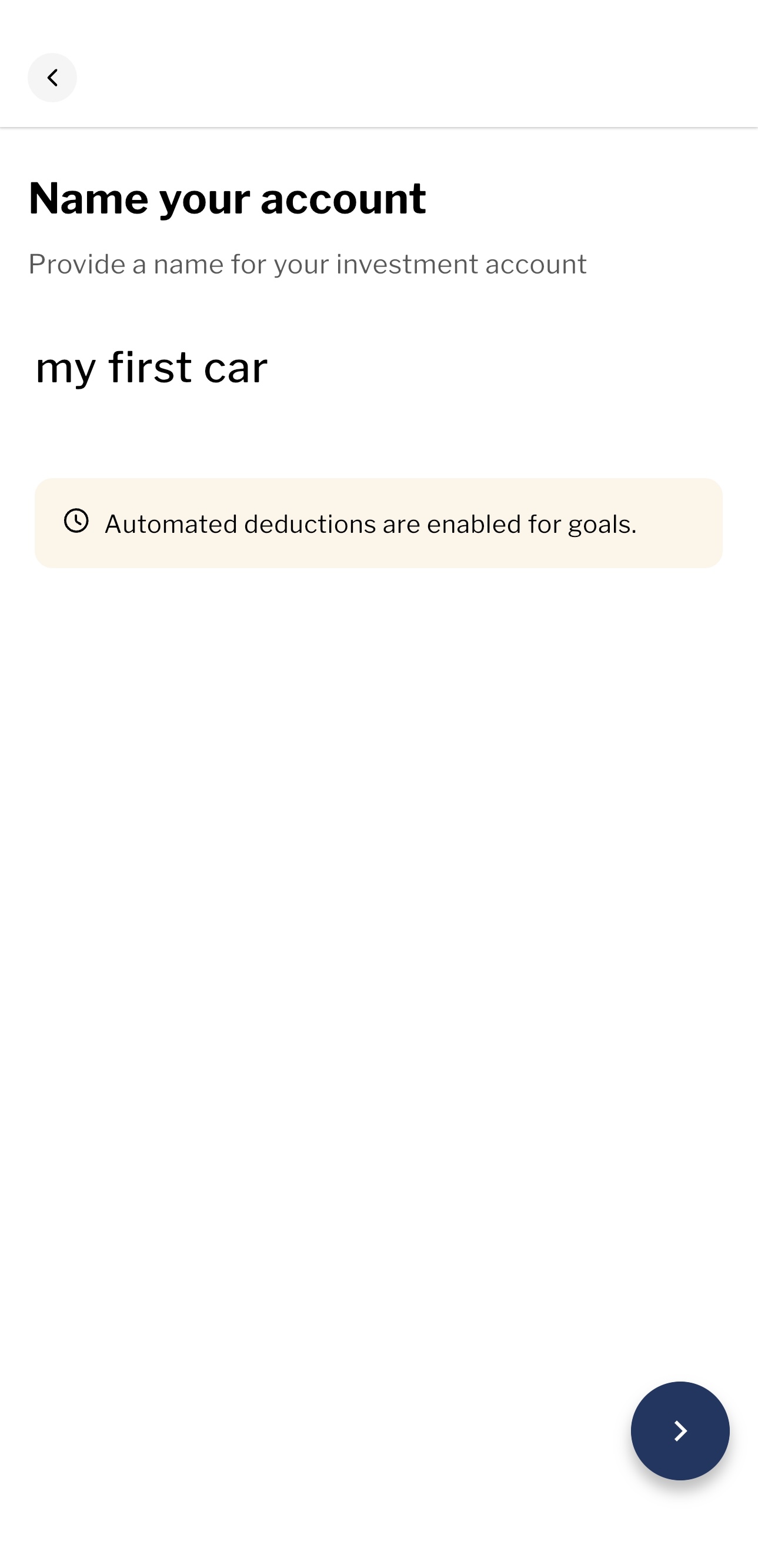
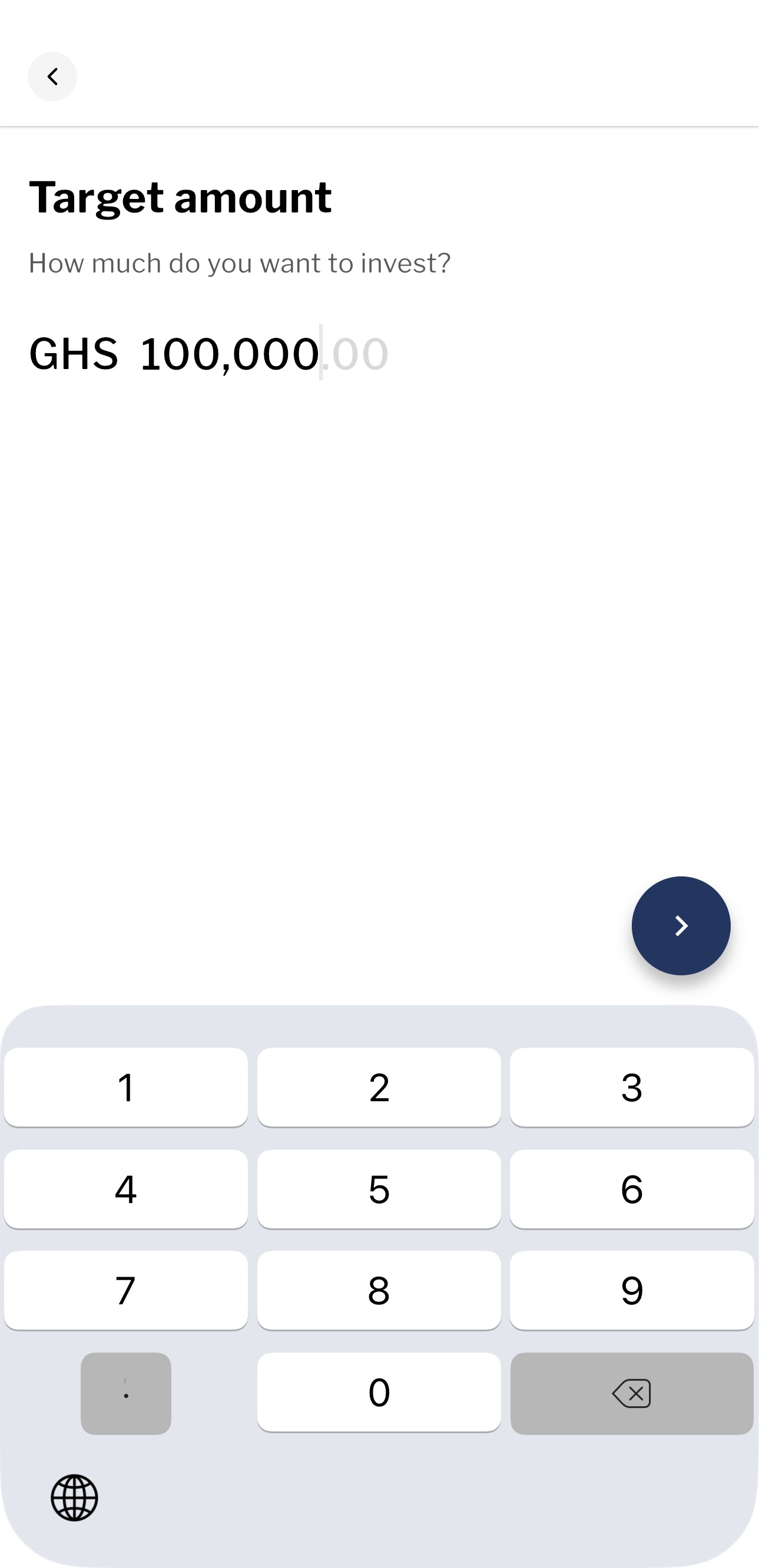
Step 6: test whether the suggested amount is affordable
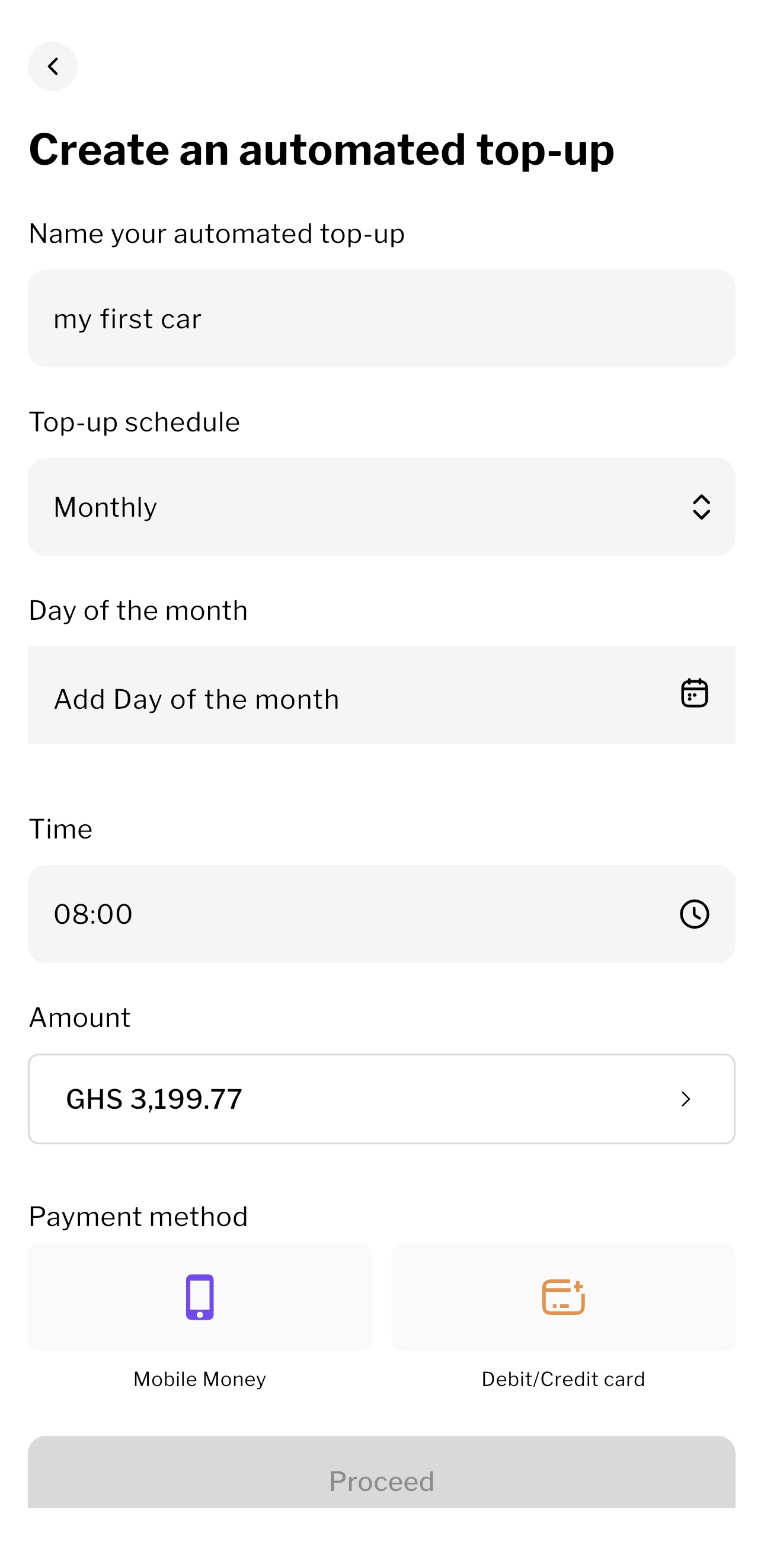
In the supplied example, the app displays a monthly top-up of GHS 3,199.77 for the car goal.
This is the estimate shown in that screenshot. We have not independently reconstructed its starting date, number of payments, investment-return assumptions or treatment of fees. Do not copy it into a new plan and assume the same result.
View the date, frequency and contribution estimate
Classroom example: Ama's equipment goal
Ama, a fictional designer in Tema, wants GHS 12,000 for work equipment. She already has GHS 3,000 set aside and has 18 monthly contributions left.
Ignoring returns and fees:
Remaining gap = GHS 12,000 - GHS 3,000 = GHS 9,000
Monthly contribution = GHS 9,000 / 18 = GHS 500
This simple calculation checks affordability without relying on an assumed investment return. It does not guarantee an investment balance: losses, fees and changes in the equipment price can affect the outcome.
Suppose Ama can afford only GHS 300 each month. What would she have contributed towards the target after 18 payments, including her initial GHS 3,000?
Show the worked answer
GHS 300 x 18 = GHS 5,400 in new contributions.
GHS 3,000 + GHS 5,400 = GHS 8,400, before investment results and fees.
The gap to GHS 12,000 is GHS 3,600. Ama can reconsider the target, allow more time, or increase contributions if affordable. She should not assume uncertain returns will fill the gap.
Use the same check when an app suggests an amount. Adjusting the payment downward may require a later deadline or a smaller target. A goal-setting tool cannot remove that trade-off.
Step 7: understand Auto Top-Up before authorising it
The supplied Auto Top-Up screen asks for a name, schedule, day, time, amount and payment method. Mobile Money and debit/credit card options are visible.
Choosing a goal frequency is not proof that money has moved. Auto Top-Up is a payment arrangement that needs its own review.
View the Auto Top-Up setup screen
Before confirming:
- Check the amount. Make sure it fits after essential spending and other commitments.
- Choose the schedule. For regular salary income, a date after payday may be easier to maintain.
- Check the funding source. Confirm the correct wallet or card and the total charge.
- Read the authorisation. Understand how recurring payments work and how to change or stop them.
- Ask about failed payments. Does the system retry, notify you, or require another instruction?
- Verify the first payment. Match the debit, confirmation and investment credit.
A card option on the screen is not a reason to borrow to invest. If a credit card would create interest or repayment pressure, include those costs in your decision.
If money is debited but does not appear as invested, check the stated processing period and contact support with the transaction reference. Do not immediately repeat the payment without investigating.
Step 8: check withdrawals and the full cost
Your goal date and the date money reaches your bank or MoMo wallet may differ. Allow time for the applicable withdrawal process.
Ask about:
- Deposit processing before money becomes invested or withdrawable.
- Withdrawal notice, settlement time and non-working days.
- Any lock, minimum balance or early-exit condition.
- Standard versus express withdrawal charges.
- Payment-channel charges and ongoing fund costs.
- Whether a quoted return is before or after fees.
There is conflicting public fee information: Achieve's homepage advertises zero transaction fees for DigiSave, while its FAQ lists top-up and express-withdrawal charges. These may reflect different scope or updates. Confirm the terms applying to your chosen product and payment method on the current screen or with support before paying. Homepage · FAQ
A useful distinction: a product can have no subscription charge but still incur annual management costs. Achieve's DigiSave Plus page separately lists subscription/redemption charges and annual management/trustee fees. DigiSave Plus fee information
For a fictional cost exercise, a 1% charge on GHS 500 is GHS 5. Depending on how a charge is applied, you could pay GHS 505 to invest GHS 500, or pay GHS 500 and have GHS 495 invested. This is arithmetic, not a quotation of Achieve's current payment terms.
Step 9: use the other features deliberately
Fixed Investments
A specified investment period needs to fit your deadline. Before confirming, ask what happens at maturity, whether renewal is automatic, whether early access is possible, and how the proceeds are calculated. The menu name alone does not answer those questions.
For example, Kofi needs money for school fees in four months. He should establish when he can actually receive proceeds before choosing an investment with a longer term.
Groups
A shared goal needs shared rules. For a family project or an association in Accra, agree who owns contributions, who can authorise withdrawals, how members can leave and how disputes are handled.
Check how the app implements those rules. A group feature does not automatically supply the governance your group needs.
Investment Challenges
A challenge may help build a habit, but participation is not evidence that its investment is suitable. Check the dates and terms, and choose a contribution you can sustain.
Pension-related services
The supplied Explore screen offers linking and managing Petra accounts. Check which account and scheme you are linking. Seeing this feature does not mean all your pensions are automatically connected or that retirement money has the same access rules as another investment.
Our Ghana pension lesson explains the different tiers.
Your first-use checklist
Before making a contribution, complete this sentence:
I am putting GHS __ into __, managed by __, for __. I expect to need the money on __. I understand the main risks, charges and withdrawal process.
Then:
- Check affordability using your monthly budget.
- Keep money for immediate needs accessible; revisit emergency savings.
- Read and retain the applicable product terms.
- Review every recurring payment instruction.
- Check actual contributions against your plan each month.
You can learn how the app works before deciding whether to invest. Setting a goal is useful; choosing and monitoring a suitable investment is the next responsibility.
Explore Achieve using MINT's invitation
If you want to explore the app after reading this lesson, use the invitation below.
Download or open Achieve — MINT referral link
Referral disclosure: this is MINT's referral invitation. The referrer may receive a benefit under the provider's applicable terms. Check any offer in the app; no specific bonus or return is promised here. This lesson is educational and is not paid or sponsored by Petra.
The invitation does not require you to select a product before understanding it. Make that decision based on your goal, budget and the current terms.
Check your understanding
Choose an answer to see why it works or what to reconsider. You can try every answer. Nothing is scored or saved.
This is general financial education, not financial advice. Figures are illustrative. Speak to a licensed professional before making investment decisions.
Figures as of 9 October 2026; interface examples supplied by MINT; product terms may change. Sources: SEC Ghana: licensed broker-dealers, Achieve: provider and platform, Achieve: Goals, Achieve: account, payment and withdrawal FAQs, Achieve: DigiSave Plus product explanation